so I've run an active full backup on our workloads and then an incremental.
The incremental run through appeared to be about 10 minutes faster than the equivalent V12 setup which is great (see screen shot).
So only outstanding two issues for me are;
- I Still need to dial in SAML SSO into Entra . I'm just waiting for our internal teams to sort out the config on that and I don't see any blockers so expect to have this sorted tomorrow morning and don't expect any issues on the Veeam side of things.
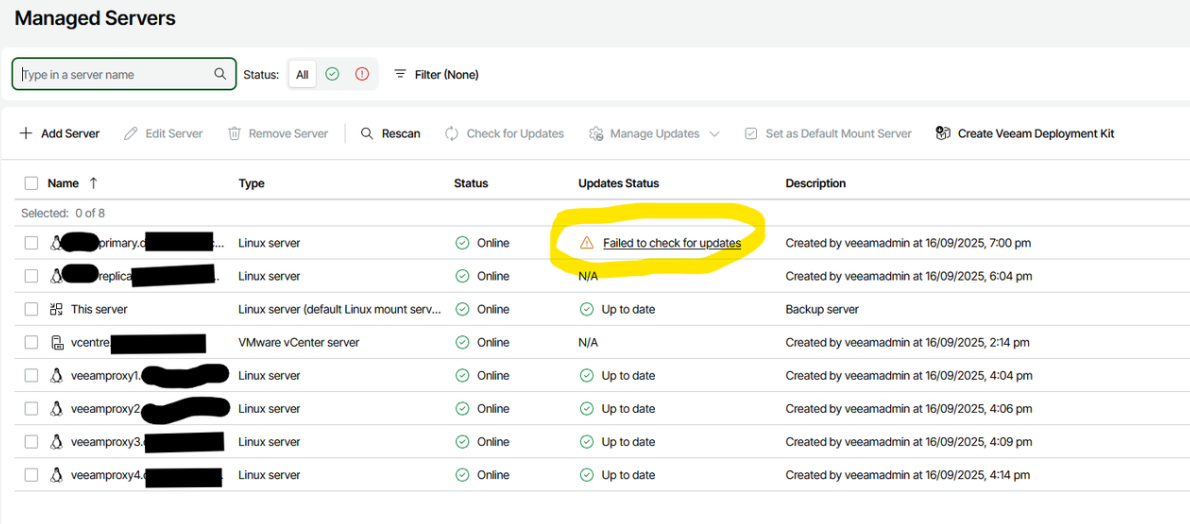
- I still can't figure out why our primary repository server (Rocky9 Linux, just like the replica server) shows as "Failed to check for updates". See image below despite the DNS and other settings being the same on both servers. I think it was because I tried to install the deployment kit onto the "broken" server originally, so suspect the machineid has persisted into the Veeam database somehow, but I haven't been able to trace it.
- I noticed that I can't backup Veeam itself with Veeam on v13 resulting in a message; "The Veeam Software Appliance cannot be added to backup jobs to protect itself (<appliance name>)". This works fine for backing up a Windows based Veeam V12 console. I understand you can take a configuration backup but it might not be quite so convenient in some DR situations, so it would be great if it was technically possible to backup v13 appliance itself.
- I'm now going to start looking at the Enterprise Manager V13 and Veeam One V13 (but those two are generally not as critical to us).
The other quirks I can work around (i.e. the missing features in the WebUI - add SSO config, notification settings to the list of missing features), and hope that the webUI features can in future match the windows thick client. (Linux all the way )
)
![Image]()
![Image]()
cheers
Ashley
The incremental run through appeared to be about 10 minutes faster than the equivalent V12 setup which is great (see screen shot).
So only outstanding two issues for me are;
- I Still need to dial in SAML SSO into Entra . I'm just waiting for our internal teams to sort out the config on that and I don't see any blockers so expect to have this sorted tomorrow morning and don't expect any issues on the Veeam side of things.
- I still can't figure out why our primary repository server (Rocky9 Linux, just like the replica server) shows as "Failed to check for updates". See image below despite the DNS and other settings being the same on both servers. I think it was because I tried to install the deployment kit onto the "broken" server originally, so suspect the machineid has persisted into the Veeam database somehow, but I haven't been able to trace it.
- I noticed that I can't backup Veeam itself with Veeam on v13 resulting in a message; "The Veeam Software Appliance cannot be added to backup jobs to protect itself (<appliance name>)". This works fine for backing up a Windows based Veeam V12 console. I understand you can take a configuration backup but it might not be quite so convenient in some DR situations, so it would be great if it was technically possible to backup v13 appliance itself.
- I'm now going to start looking at the Enterprise Manager V13 and Veeam One V13 (but those two are generally not as critical to us).
The other quirks I can work around (i.e. the missing features in the WebUI - add SSO config, notification settings to the list of missing features), and hope that the webUI features can in future match the windows thick client. (Linux all the way
 )
)
cheers
Ashley
Statistics: Posted by ashleyw — Sep 17, 2025 3:57 am









