thanks for sharing this, i had this issue tonight, never seen it before in years of doing thisHi all,
I recently had a similar problem (Veeam case #05377961) and wanted to add my solution here in case Googling brought anyone else this way.
My error was: Error: Failed to disable DC SafeBoot mode Cannot get [BcdObject.Id="{9dea862c-5cdd-4e70-acc1-f32b344d4795}",StoreFilePath=""] object. COM error: Code: 0x80041010
We do not use SentinelOne, however.
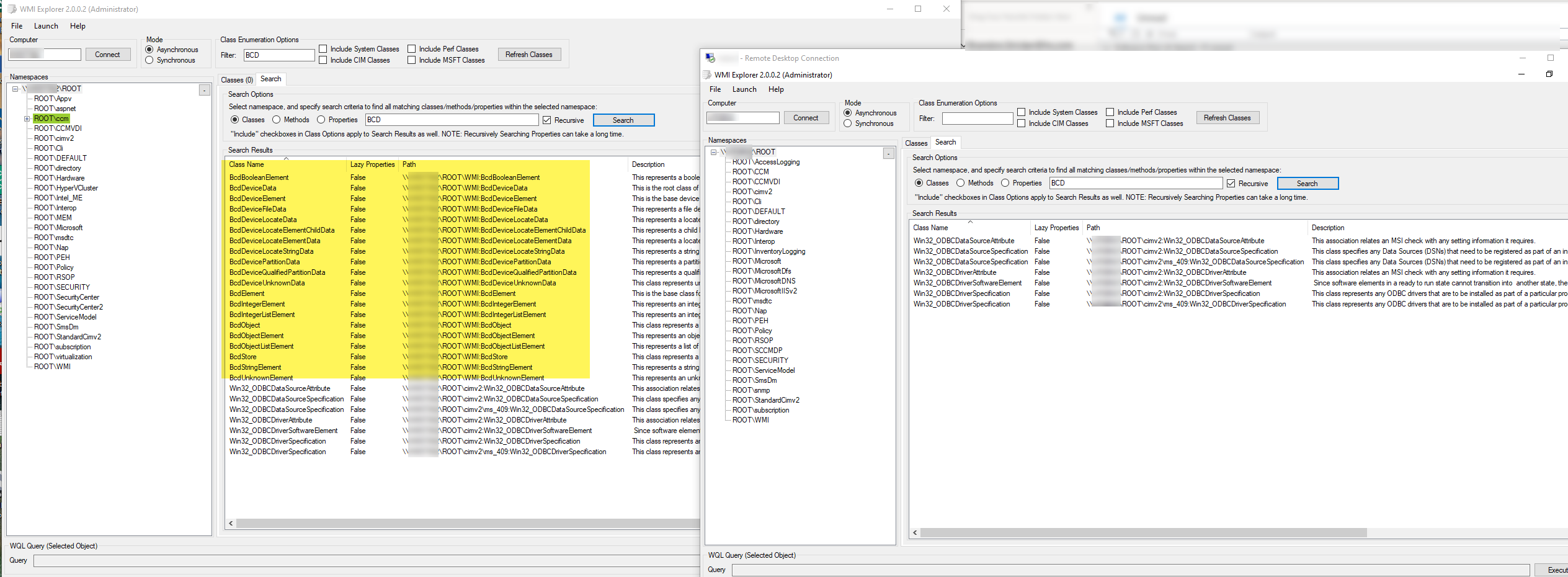
The agent log on the server contained the lines below:After various troubleshooting steps, I used a tool called WMI Explorer to compare WMI entries between the problem server (below, right) to another machine. Notice how the "BCD" entries were simply gone from the server when comparing a search side-by-side.Code:
[12.04.2022 19:05:34] <01> Info Trying to backup system volume to temp file on dc[12.04.2022 19:05:34] <01> Info Enabling AD safe boot mode[12.04.2022 19:05:34] Info <10e8> Enabling AD SafeBoot mode[12.04.2022 19:05:34] Info <10e8> Connecting to WMI namespace.[12.04.2022 19:05:34] Info <10e8> Connecting to WMI namespace.. Ok.[12.04.2022 19:05:34] Info <10e8> Enabling DC SafeBoot mode[12.04.2022 19:05:34] Info <10e8> UpdateSafeBootForAllLoaders registry value is not set. Using default value: false[12.04.2022 19:05:34] Info <10e8> Enabling DC SafeBoot mode. Failed.[12.04.2022 19:05:34] Info <10e8> Enabling AD SafeBoot mode. Failed.[12.04.2022 19:05:34] <01> Info Disabling AD safe boot mode[12.04.2022 19:05:34] Info <10e8> Disabling AD SafeBoot mode[12.04.2022 19:05:34] Info <10e8> Connecting to WMI namespace.[12.04.2022 19:05:34] Info <10e8> Connecting to WMI namespace.. Ok.[12.04.2022 19:05:34] Info <10e8> Disabling DC SafeBoot mode[12.04.2022 19:05:34] Info <10e8> Loading original SafeBoot values from file [C:\ProgramData\Veeam\Endpoint\Backup\bcdorig.xml][12.04.2022 19:05:34] Info <10e8> Loading original SafeBoot values from file [C:\ProgramData\Veeam\Endpoint\Backup\bcdorig.xml]. Failed.[12.04.2022 19:05:34] Warning <10e8> Unable to read original SafeBoot values.[12.04.2022 19:05:34] Warning <10e8> Cannot load the specified XML file: [C:\ProgramData\Veeam\Endpoint\Backup\bcdorig.xml].[12.04.2022 19:05:34] Warning <10e8> COM error: The system cannot locate the resource specified. Code: 0x1[12.04.2022 19:05:34] Info <10e8> UpdateSafeBootForAllLoaders registry value is not set. Using default value: false[12.04.2022 19:05:34] Info <10e8> Disabling DC SafeBoot mode. Failed.[12.04.2022 19:05:34] Info <10e8> Disabling AD SafeBoot mode. Failed.
To fix it, I opened an Administrator command prompt and CD'd to c:\windows\system32\wbem. Running the command "mofcomp bcd.mof" fixed the issue. Re-running the search in WMI Explorer found the BCD entries just like it did on the comparison machine. The Veeam job then successfully ran.
I have no idea how the BCD entries disappeared from WMI in the first place, but I hope this helps someone.
this post was literally the only info i could find about it and it fixed the issue for me too
you're a legend, cheers
Statistics: Posted by pat_ren — Aug 26, 2025 6:57 pm











